 Русский
 Azərbaycanca
 Oʻzbekcha
 Кыргызча
Mellstroy Casino App: Three Platforms, Three Ways to Install
Mellstroy Casino app download depends on your device: Android takes an APK from Mellstroy's site, iPhone uses a PWA shortcut through Safari, and Windows installs a PWA from the browser. Your account and balance stay the same across devices. You can also play through the mobile site without installing anything.
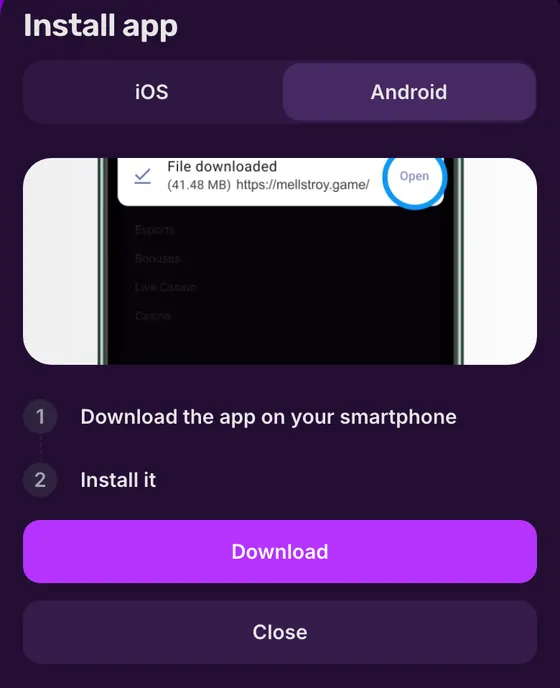
- Choose the Android APK or a browser-installed PWA for iPhone and Windows.
- Google Play and the App Store have no app from the operator.
- Get the APK through the site's installation window; on iPhone, add the site to your Home Screen in Safari.
- Installation is optional for access to the games.
Mellstroy app at a glance
Your device determines the installation route and which Mell Points rewards apply.
| Feature | What you get |
|---|---|
| Google Play and App Store | No operator app in either store |
| Android | APK from the operator's site |
| iOS | PWA shortcut through Safari |
| Windows | PWA installed through the browser |
| macOS | Installation instructions from the site footer |
| Android/iOS installation | +200 Mell Points once, credited automatically |
| First push subscription | +100 Mell Points, Android only |
| Mobile browser | All casino and sports sections |
| Account and balance | Shared across devices and installed versions |
Use the Android APK installation steps when your phone asks you to open an installation file.
Mellstroy app download on Android, iPhone and Windows
Android installs a file; iPhone and Windows install the site as a PWA. The table separates the download route from the rewards, so you can follow the right steps for your device.
| Feature | Android | iPhone / iPad | Windows |
|---|---|---|---|
| Installation format | APK file | PWA shortcut | PWA window |
| Where to start | Site installation window | Site open in Safari | Site open in a PWA-capable browser |
| Installation reward | +200 Mell Points | +200 Mell Points | Reward applies to Android/iOS |
| Push reward | +100 Mell Points | Android only | Android only |
| After installation | App icon | Full-screen site from a Home Screen icon | Separate window; can pin to taskbar |
| Store needed | No | No | No |
The installed version keeps your existing account, so moving from a browser to a PWA does not require another registration. New accounts start through the site's registration form.
Android APK from the site's installation window
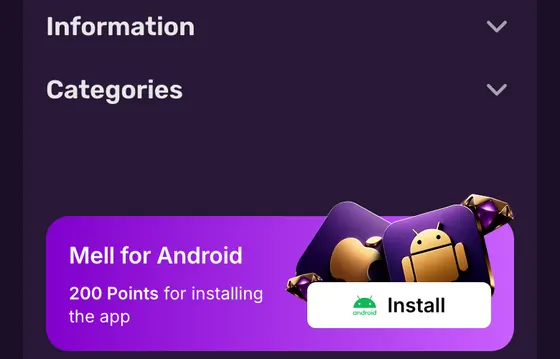
The Android APK comes from Mellstroy's site. Open it in your phone browser and use the installation option; the English mobile header labels that entry “Install”.
- 1
Get the APK
Open the site's installation window and use its download control to save the Android file. - 2
Open the file
Open the downloaded APK on your phone to start Android's installation process. - 3
Allow installation
If Android blocks the file, allow installation from unknown sources when prompted, then continue. - 4
Finish and open
Complete the installation and open the app. Use the same account as on the website.
The “Install” entry sits above the site's “Login” and “Registration” buttons. Its “iOS and Android” label covers different installation methods: Android downloads a package, while iPhone adds a PWA shortcut.
Open the APK from this installation window rather than an unrelated download listing. If you need the current site address first, use the mirror and access options.
 App
Add the iPhone PWA through Safari
Safari creates the iOS PWA shortcut without an APK. On a device set to English, use the system's Share menu and Home Screen option instead of searching the App Store.
- 1
Open Safari
Load Mellstroy's site in Safari on your iPhone or iPad. - 2
Tap Share
Open Safari's Share menu while the site is on screen. - 3
Add to Home Screen
Choose Add to Home Screen to create the PWA shortcut. - 4
Confirm with Add
Tap Add, then open the new Home Screen icon to launch the PWA.
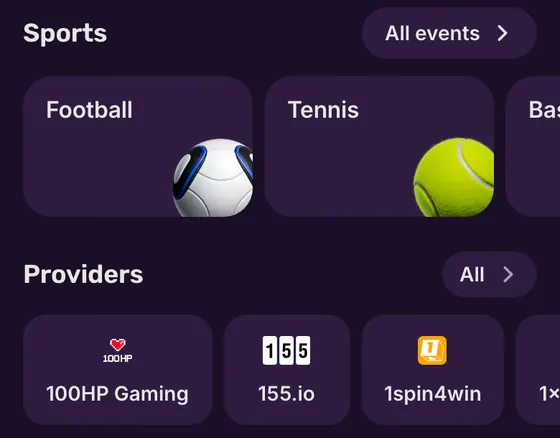
The PWA opens full screen. Its bottom navigation contains Menu, Casino, Deposit, Bonuses and Sport, so you can move between play and your account without returning to a browser tab.
Your balance and active bonuses belong to the same account as on the website. Use your usual login method when the PWA asks you to sign in.
Windows browser installation and the macOS Dock
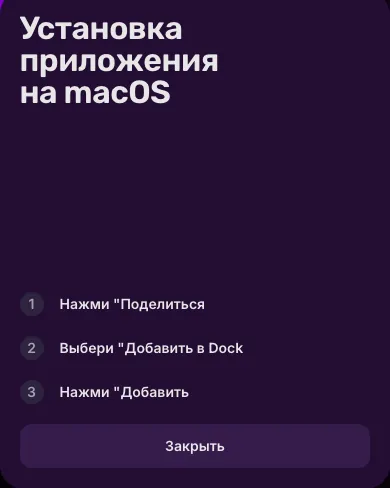
Desktop installation keeps the site in its own PWA window. Windows uses the browser's installation control; macOS has instructions linked from the site footer.
Windows PWA window
Open the site in a browser that supports PWA installation and accept its installation prompt. The PWA runs in its own window, separate from your browser tabs. You can pin its shortcut to the Windows taskbar.
The account stays synchronised with the website. Opening the desktop PWA does not create a separate balance or a new set of bonuses.
macOS shortcut in the Dock
The footer's macOS option opens instructions for adding the site to the Dock. The steps are Share, then Add to Dock, then Add; this creates a PWA shortcut.
The mobile installation reward applies to Android and iOS. Desktop installation gives you a separate window; the Mell Points conditions cover the eligible reward routes.
Installation rewards and Mell Points exchange
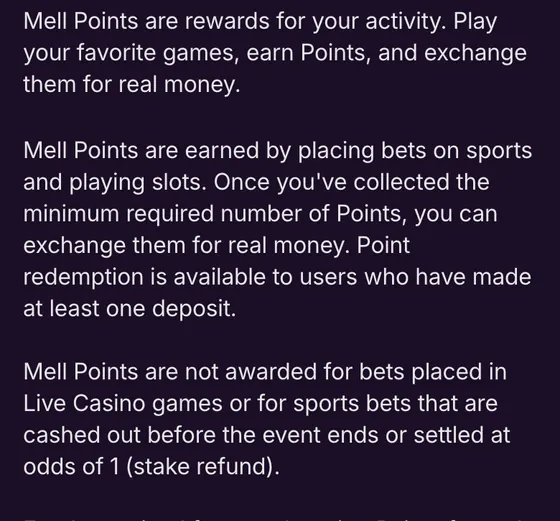
Installation credits loyalty points automatically on Android and iOS. Those points join your Mell Points balance; exchanging them for money requires a deposit and the redemption threshold.
Installation: +200 Points
A one-off reward after successful installation on Android or iOS. Mellstroy credits it automatically.Exchange from 1 200 Points
At least one deposit is required. Exchange gives 8 USD or 8 EUR for this points amount; the credited money has x1 wagering.Push: +100 Points
First subscription to push notifications earns an automatic reward on Android only.Earn through play
Slots and sports bets earn points. Live casino, sports bets sold before the event ends and sports bets settled at odds of 1 do not.
Installation points do not bypass the deposit condition. To redeem a qualifying balance, open your balance, choose Mell Points in the profile, select an amount and exchange it. Rates are in the points exchange table.
The Promotions section also has an app-rewards card. Its own conditions govern those offers.
The separate welcome bonus offers up to 550% + 400 FS on the first 4 deposits; up to 660% + 400 FS on a crypto account. No promo code is needed; free spins follow the percentage bonus.
The mobile browser opens the same sections
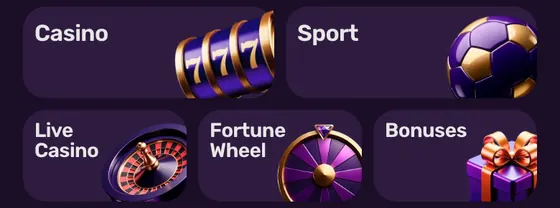
All casino and sports sections work in the mobile browser. Installation adds an icon and the eligible mobile reward; it does not create a separate game catalogue or account.
- Stay in the browser if you want to open the site without installing a file or shortcut.
- Use the iOS or Windows PWA for a separate window without the browser controls.
- Keep the same account when switching between the mobile site and an installed version.
- Use Android's push subscription for the Android-only subscription reward.
Deposits and withdrawals use your existing account
The app or PWA uses the same cashier as the website, with the methods shown in your cashier. Deposits go through the payment options; no separate app balance is needed.
The operator can request KYC documents at any time, and withdrawals require completed deposit verification. The same account rules apply when you use the PWA, so installing a shortcut does not remove the verification step.
Withdrawals start at 10 EUR or equivalent; Mellstroy quotes up to 72 hours, usually 5–15 minutes, depending on method and account status. Account checks that can affect a request are in the withdrawal conditions.
 App
Recognise the download source and protect your account
Store listings with the Mellstroy name are third-party products. Mellstroy supplies the Android file through its site; its chat and Telegram channel provide current access addresses.
Allowed
- ✓Get the Android package from the site's installation window.
- ✓Use Safari for an iOS PWA shortcut.
Not allowed
- ✕Do not treat third-party APK listings as the operator's app.
- ✕Do not install APK files supplied by unrelated chats.
Watch out
- !The website protects the account with a password; it has no 2FA or biometrics.
- !Mellstroy permits one account per person and prohibits VPN, proxy and TOR use.
Installation mistakes to avoid
- 1
Searching an app store for the package
Start with the site installation option. Mellstroy has no Google Play or App Store app. - 2
Leaving Android permission enabled
After installation, you can restore the block on unknown sources in Android's settings.
A new installation does not replace your existing credentials. For account access or password recovery, follow the login and recovery steps.
If the APK, shortcut or site will not open
The fix depends on where installation stops. Android needs permission to open the package; iPhone needs Safari's Home Screen action. Site access and missing reward credits go through support.
Android blocks the APK
Allow installation from unknown sources when prompted, then continue opening the file from the site's installation window.No Add to Home Screen on iPhone
Open the site in Safari and use its Share menu to add the PWA shortcut.The site address will not open
Ask Mellstroy's chat or Telegram channel for the current address. You can also open an already installed app or PWA.Installation points have not arrived
The reward follows successful installation automatically. If it has not arrived, contact the operator's support chat.Windows has no installation prompt
Open the site in a browser that supports installing PWAs and use its installation control.
Support chat runs 24/7; email support is [email protected]. For site access, the mirror options include Mellstroy's push updates; for a missing reward, use the support contacts.
APK, PWA and Mell Points explained
- APK
- Android application package: the file you open to install the Android app.
- PWA
- Progressive web app: a website installed with its own shortcut and window.
- Mell Points
- Mellstroy's loyalty points. Installation earns points; exchanging them requires a deposit and the minimum points balance.
- KYC
- Know Your Customer: identity checks for which Mellstroy can request documents.
Sources
Where the facts on this page come from
- Mellstroy mobile siteInstallation entry and mobile sections
- Mellstroy promotionsInstallation, push and Mell Points rewards
- Mellstroy rulesAccount and payment conditions
Mellstroy app installation questions
No. Neither store carries the operator's app. Download the Android APK through Mellstroy's site; use a PWA on iPhone or Windows. Any store or APK-aggregator listing under the same name is not Mellstroy's own app.
Start on Mellstroy's site in your phone browser. Open the installation option, download the APK from its window and open the file. Allow installation from unknown sources when Android asks for permission.
Open the site in Safari, tap Share, choose Add to Home Screen and confirm with Add. These are the system labels on an English-language iPhone. The resulting icon opens the PWA rather than an App Store download.
Yes, as a PWA. Windows installs it through a supporting browser and opens it in a separate window. On macOS, the site's footer opens instructions for adding the site to the Dock. Both routes use your existing account.
200 Mell Points, credited automatically once after successful installation on Android or iOS. This adds points to your loyalty balance; it does not give you cash to withdraw. The Mell Points exchange rules explain how redemption works.
No. The mobile browser opens all casino and sports sections. Installation adds a shortcut and, on eligible mobile devices, the installation reward. Your existing account login works across the site and installed versions.
- First version: installation steps for Android, iPhone and desktop, with Mell Points conditions and fixes.
About this site
This site is informational: it is not Mellstroy or its official page, and it takes no deposits or bets.
The operator does not publish a licence, regulator or legal entity. Under its Terms, whether online gambling is allowed where you live is yours to check; the rules allow one account per person and prohibit VPNs, proxies and TOR.
18+ only. Gambling can be addictive – read the safer-gambling page.
Welcome offer